How to Detect Web Shells on WordPress Using Regex
Web shells are the backdoors attackers leave behind after a WordPress hack. Learn the exact regular-expression signatures that expose hidden PHP shells, how to scan your site with grep, and how to kee
A web shell is the quiet endgame of most WordPress compromises. Once an attacker slips a single malicious PHP file onto your server, they no longer need your password, a vulnerable plugin, or even the original entry point. They have a permanent door: a script that accepts commands over HTTP and runs them with the privileges of your web server. Web shells are how a one-time exploit becomes weeks of data theft, spam injection, and pivoting to other sites on the same host.
The good news is that web shells, however they are disguised, almost always contain a small set of tell-tale building blocks. They have to take attacker input, and they have to execute it. That structural fingerprint is exactly what a well-built regular expression can catch. This guide walks through the regex signatures that reliably surface hidden PHP backdoors, how to scan a real WordPress install, and where pattern matching alone runs out of road.
Why regex works against web shells
Obfuscation makes a shell hard for a human to read, but it cannot hide the language primitives the shell depends on. PHP can only run dynamic code through a finite list of functions, and it can only read incoming requests through a finite list of superglobals. No matter how many layers of base64, gzinflate, or hex escapes an attacker wraps around their payload, the call to eval() or system() still has to appear somewhere in the file. Regex thrives on that inevitability: you are not trying to understand the malware, only to spot the parts it cannot do without.
The strongest detection does not rely on one magic pattern. It combines four independent signature classes and scores them together. A file that matches several classes at once is almost certainly a shell; a file that matches just one is a lead to review.
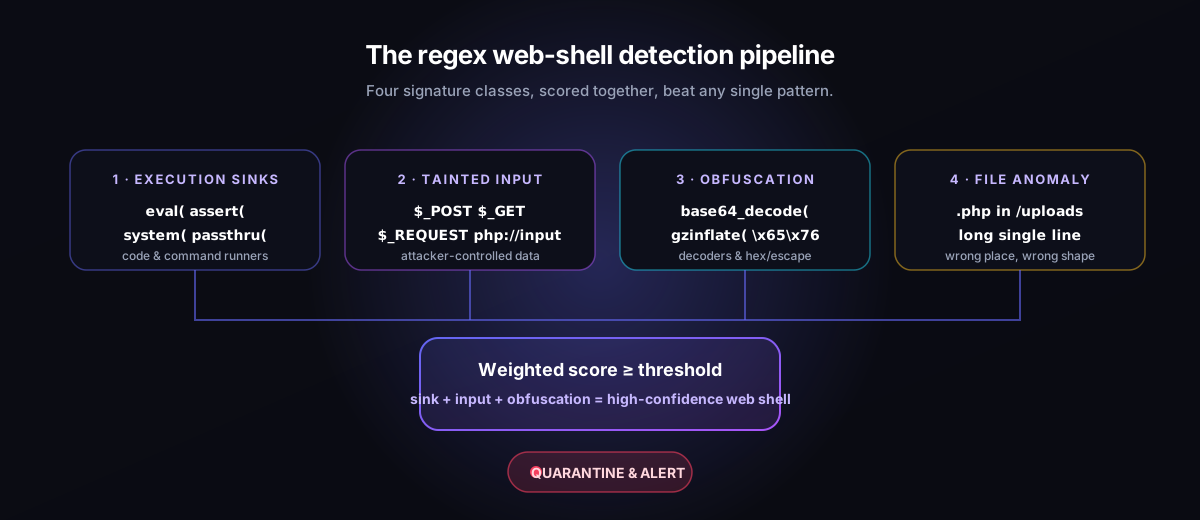
Signature class 1: execution sinks
The single most valuable class is the set of functions that turn a string into running code or shell commands. These are the “sinks” where a payload finally detonates. A compact pattern that covers the worst offenders looks like this:
(?:\beval|\bassert|create_function|\bsystem|\bexec|shell_exec|passthru|popen|proc_open|pcntl_exec)\s*\(Used with PCRE-aware grep, that one line finds the engine of nearly every shell. Note the \s*\( tail: attackers often pad function names with spaces or newlines before the opening parenthesis to dodge naive string matching, so the pattern allows for whitespace. The word boundaries (\b) keep eval from matching inside harmless identifiers like retrieval.
Signature class 2: tainted input
An execution sink is only dangerous when it is fed attacker-controlled data. WordPress and plain PHP expose request data through a small, well-known set of superglobals, and shells reach for them constantly:
\$_(?:POST|GET|REQUEST|COOKIE|SERVER)\[|php://input|file_get_contents\s*\(\s*['\"]php://inputWhen you see one of these input sources on the same line, or within a few lines, of an execution sink, your confidence should jump sharply. The classic one-line shell — eval($_POST['cmd']) — trips both class 1 and class 2 simultaneously, which is precisely the kind of correlated match a scoring engine rewards.
Signature class 3: obfuscation and decoders
Because the bare combination above is so easy to flag, real-world shells hide their payload behind a decoding step and only assemble the dangerous call at runtime. The decoders themselves become a signature:
(?:base64_decode|gzinflate|gzuncompress|str_rot13|hex2bin|convert_uudecode)\s*\(|\\x[0-9A-Fa-f]{2}(?:\\x[0-9A-Fa-f]{2}){3,}The first half catches the usual decode functions. The second half catches long runs of hex escapes such as \x65\x76\x61\x6c (which simply spells eval), a favourite trick for smuggling function names past keyword filters. Heavy use of chr() concatenation, variable functions like $f($_GET['x']), and preg_replace with the deprecated /e modifier belong in this class too.
Signature class 4: file and placement anomalies
The last class is not about code content but about context. A PHP file has no business living in your uploads directory, and a legitimate theme file is rarely a single 40,000-character line of dense text. These structural cues are cheap to compute and devastating in combination with the others:
- A
.php,.phtml, or.php7file anywhere underwp-content/uploads/. - Files whose longest line runs into the thousands of characters — a hallmark of packed payloads.
- Recently modified files with timestamps that do not match any plugin or core update.
- Innocuous-looking names such as
wp-conf.php,icon.php, orstyle.phpsitting outside their expected folders.
Scanning a real install
You can run the first three classes immediately with PCRE grep from the root of your site. The flags matter: -P enables Perl-compatible regex, -r recurses, -n prints line numbers, and -I skips binaries.
grep -PrnI '(?:\beval|\bassert|create_function|\bsystem|shell_exec|passthru|popen|proc_open)\s*\(' wp-content/ \
  | grep -P '\$_(?:POST|GET|REQUEST|COOKIE)\[|php://input|base64_decode'
The second grep narrows the first pass down to the lines that also touch tainted input or a decoder, which collapses a noisy list into a short, high-confidence one. To hunt the file-placement anomaly separately, list every PHP file under uploads:
find wp-content/uploads -type f -iregex '.*\.\(php\|phtml\|php[0-9]\)$'Any hit from that command deserves immediate inspection — legitimate plugins effectively never write executable PHP into the uploads tree.
Keeping false positives under control
Regex is blunt, and a few legitimate components do use base64_decode or even eval for caching and template compilation. To avoid drowning in noise, lean on three habits. First, require correlation: treat a single class-3 match as informational, and only escalate when a sink and an input source appear together. Second, compare against known-good: diff suspect files against a fresh copy of the same plugin or WordPress core, so you flag only what changed. Third, weight by location: the same pattern is far more alarming in uploads/ or a mu-plugin than in a vendor library you installed yourself. A scoring model that adds points per class and fires only above a threshold turns these instincts into a repeatable rule.
Where regex stops being enough
Pattern matching is a fast first pass, not a verdict. Advanced shells split a single eval across multiple files, store their payload in the database or in an image’s EXIF data, or rebuild forbidden function names from arithmetic so that no literal string ever appears. None of those survive a behavioural look at the file, but they can absolutely slip past a naive regex. That is why serious cleanup pairs signature scanning with integrity baselines (so any new or altered file is noticed regardless of its contents), with checks for hidden administrators and rogue scheduled tasks, and with a timeline of when each suspicious file appeared.
Run the grep commands above today; they cost nothing and routinely surface shells that scanners miss. But if a file matches, do not just delete it — attackers almost always plant several. Hunt for the rest, find the entry point that let the first one in, and preserve evidence before you clean. That layered approach — regex to find, integrity and forensics to confirm — is exactly what Armory Security automates for WordPress, so the next time a shell lands you see it in minutes instead of months.